A hand that pats and squishes
The picture stretches wide and squashes down under each pat, then springs back, in one seamless loop.
Pick any picture and a cartoon hand pats it on the head, squishing it with every pat: the classic pet pet GIF. Transparent, in Discord emoji sizes, made in your browser.
Turn any picture into a pet pet GIF.
An avatar, a selfie, a pet, an emoji, anything square-ish works best. Drop, paste or pick. Nothing is uploaded.
Tip: for Discord and Slack emoji pick 112 or 128 px with a transparent background. Discord rejects emoji over 256 KB.
Headpat GIF made in your browser: your picture is not uploaded. Free, no watermark.
A pet pet GIF made with this page from the built-in sample face.
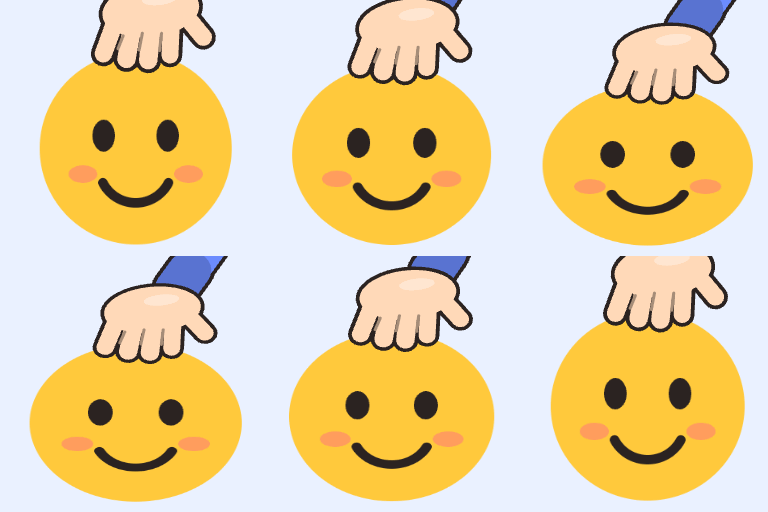
The hand comes down, the picture spreads wide and flattens, then springs back as the hand lifts. Ten frames in 0.4 seconds make one seamless pat. This example is 256 px; for a Discord or Slack emoji use 112 or 128 px with the transparent background.
Headpat GIFs are mostly used as custom emoji, so the defaults are built for that.
The picture stretches wide and squashes down under each pat, then springs back, in one seamless loop.
Slow, gentle pats or frantic ones. Squish from barely there to fully flattened.
Leave the background clear so the GIF sits cleanly on Discord, Slack or any chat theme, or pick a color.
Turn a square avatar into a circle, the way Discord and Slack show profile pictures.
Six skin tones and any sleeve color. The hand can come from the right or the left.
From 64 to 512 px. A size check warns you if the GIF goes over Discord’s 256 KB emoji limit.
A sample face is patted as soon as the page loads. Swap in your own picture.
An avatar, a pet, a friend, an emoji. Square pictures with the face near the middle work best.
Set speed and squish, choose round crop, the hand colors and the size.
Download the GIF and add it as a custom emoji or send it in chat.
Emoji have file size limits; shared GIFs do not.
| Size | Use it for | Good to know |
|---|---|---|
| 64 px | Tiny reactions and inline emoji | Faces must fill the frame to be readable |
| 112 px | Discord emoji and Twitch-style emotes | Usually well under 256 KB |
| 128 px | Discord and Slack custom emoji | The preview warns if the file is over 256 KB |
| 256 px | Stickers and sharing in chat | Too heavy for most emoji slots |
| 512 px | Posts and large stickers | For sharing only |
Pet pet GIFs started as a chat meme and stayed there.
Upload the 112 or 128 px transparent version as a custom server emoji.
Add it as a custom emoji to thank a teammate for something small.
A headpat for someone having a rough day, made from their own avatar.
A pet pet of your channel mascot for chat or as a channel point reward.
Small details decide whether it reads at emoji size.
Use a picture where the face fills most of the frame; tiny faces disappear at 112 px.
Transparent pictures (PNG stickers, emoji) look best with the transparent background left on.
For Discord emoji, 112 or 128 px usually stays well under 256 KB. Larger sizes are for sharing in chat.
Faster speeds read as excited, slower ones as gentle. Around 0.4 s per pat is the classic feel.
Round crop plus a transparent background looks like a patted Discord avatar.
Formats, privacy and limits, answered.
A meme animation where a hand repeatedly pats the top of a picture, squishing it with each pat. It is used as a custom emoji to say “there, there” or “good job”.
Save your avatar image, open it here, and download the GIF. Turn on round crop if your avatar is shown as a circle.
No. The headpat GIF maker runs in your browser. The picture is drawn and encoded on your device.
Yes. Make the pet pet GIF at 112 or 128 px with a transparent background. Discord accepts animated emoji up to 256 KB; the preview tells you if the file is over that.
No. The hand is original artwork drawn by the tool, so you can use the GIF without worrying about someone else’s sprite.
Not in this tool. Download the headpat GIF and open it in the GIF caption maker to add a caption above it.
Original animated GIFs from the library. Download one as it is, or use it as a starting point.
 Text to GIFType words and get an animated GIF: ten effects, five fonts, transparent backgrounds.
 Photo to GIFTurn several pictures into one animated GIF, with crossfades, zoom and loop control.
 Happy Birthday GIF with NamePick a birthday design, type a name and download a personal birthday GIF.
 Meme GIF MakerPut classic top and bottom meme text on any GIF, keeping every frame.
 GIF Caption MakerAdd a white caption bar above any GIF, the reaction-caption format.
Add their avatar and the hand gets to work right away: a pet pet GIF in seconds.
Make a headpat GIFHeadpat GIF made in your browser: your picture is not uploaded. Free, no watermark.